

Claude in Excel is now available on Pro plans, a meaningful expansion for finance professionals who live inside spreadsheets all day.
Alongside broader access, the update introduced a set of workflow upgrades that sound small at first glance, but solve problems that show up constantly in real finance work:
- Bringing in multiple supporting files at once,
- Making safer edits that don’t overwrite your existing cells, and
- Keeping long analysis sessions usable through auto compaction.
If you’ve ever tried to use an AI assistant while working on a model, you know the friction points: you spend time explaining context it can’t “see,” you worry it might destroy your structure, and you hit a wall when the conversation gets too long and the assistant starts forgetting earlier assumptions.
Claude in Excel is aiming directly at those realities, by meeting analysts, FP&A teams, and investment professionals where the work actually happens.
Claude in Excel is now available on Pro plans.
— Claude (@claudeai) January 23, 2026
Claude now accepts multiple files via drag and drop, avoids overwriting your existing cells, and handles longer sessions with auto compaction.
Get started: https://t.co/cAMDXM1h7r pic.twitter.com/yt9Gy2HLY3
Excel is still the operating system of finance
Finance runs on Excel for a reason. Spreadsheets are more than just a tool for calculations, they’re how teams express assumptions, connect operating drivers to outcomes, and communicate decision-ready insights.
In practice, that means Excel work is rarely a single clean dataset. It’s a bundle of interdependent tabs, historical exports, sanity-check schedules, and “do not touch” sections that only one person truly understands. The model is part math and part institutional memory.
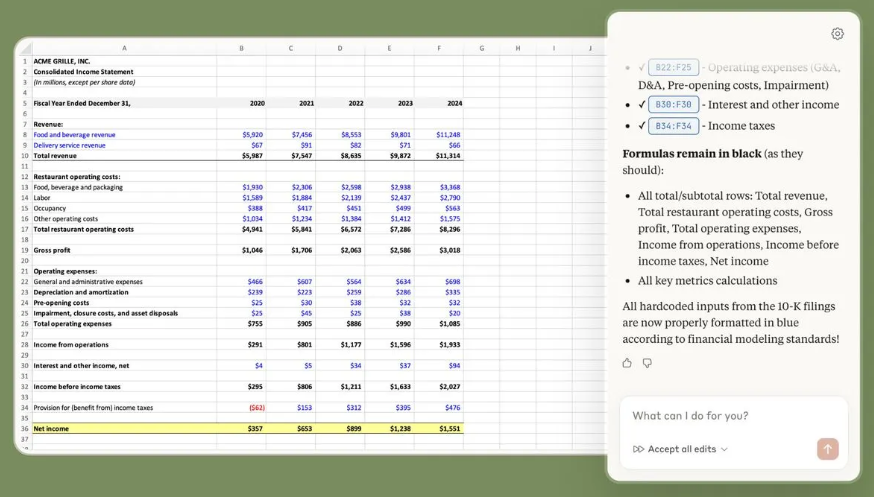
Claude in Excel is built to work inside that reality: it can understand a workbook with nested formulas and dependencies across multiple tabs, then explain what it’s doing with references back to specific cells.
This matters because finance isn’t just about getting an answer. It’s about being able to defend it.
 Finance Alliance
What Claude in Excel actually does (in finance terms)
At a high level, Claude in Excel is an Excel add-in that opens a Claude assistant alongside your workbook, so you can ask questions and make changes without leaving the spreadsheet environment.
Anthropic positions it as a tool that can understand the workbook end-to-end, explain formulas and calculation flows, and help you update assumptions while keeping the model structure intact.
That framing is important: it’s not “AI that does Excel for you.” It’s more like an analyst who can read the whole workbook quickly, follow instructions precisely, and walk you through how your model behaves.
From a finance workflow standpoint, the most valuable capabilities fall into four buckets: model comprehension, scenario work, debugging, and templated build-out.
Claude can answer questions about specific formulas, entire worksheets, or calculation logic across tabs, and it provides cell-level references so you can trace the reasoning back to where it came from.
That is especially useful when you inherit a model, come back to a file after weeks away, or need to validate what’s driving a surprising output.
Claude can also support scenario testing in a way that’s designed to preserve your dependencies rather than breaking them, with transparency into what changed.
If you’re running sensitivities across revenue growth, margin assumptions, or working capital dynamics, that kind of guided editing can save time while keeping you in control.
And when something breaks (as it always does in Excel) Claude can help trace errors like #REF!, #VALUE!, or circular references back to the source and explain the fix.
Anyone who has ever watched a model collapse five minutes before a meeting understands how valuable “faster debugging” really is.
Finally, Claude can help build draft models or fill templates with fresh data while maintaining structure and formulas. This is especially relevant for teams who reuse standardized templates across clients, business units, or investment memos.
The 2026 upgrades that matter most
This announcement wasn’t just about access.
It highlighted three improvements that directly target common Excel pain points in finance workflows:
- Multiple file drag-and-drop uploads,
- Safer non-overwriting edits, and
- Auto compaction for longer sessions.
Multiple file drag and drop: finally, real context
Finance analysis rarely lives in one workbook.
If you’re doing FP&A, you might have a budget file, a forecast file, a headcount roster, and a separate export from your ERP. If you’re in banking, you might have a working model, a CIM, and a handful of supporting schedules.
If you’re in investing, you might have management reporting, KPI dashboards, and a copy of last quarter’s assumptions.
Being able to drag and drop multiple files into Claude in Excel means you can supply supporting context without turning your workflow into an administrative task.
In practical terms, this makes it easier to do the kind of work finance teams actually do:
You can reconcile drivers across different files, check whether a revenue bridge aligns with a historical export, or compare new assumptions to a prior forecast.
The benefit isn’t just convenience, but that analysis improves when the assistant has more of the supporting evidence in one place.
Avoids overwriting your existing cells: safer assistance inside live models
Most finance professionals don’t fear change. They fear uncontrolled change.
Spreadsheets are fragile because they’re interconnected. One accidental paste or a misplaced hardcode can ripple across the whole model.
That’s why experienced analysts develop defensive habits: duplicate tabs, version files obsessively, protect sheets, and avoid unnecessary edits.
Anthropic’s update emphasizes that Claude now avoids overwriting your existing cells, which is exactly the kind of “boring” feature that determines whether something is usable in production finance work.
This aligns with the broader positioning of Claude in Excel around transparency and formula integrity, keeping structure and formatting intact, and showing changes with explanations.
For finance teams, safer edits mean you can use Claude for what it’s best at (speeding up reasoning and reducing manual work) without constantly worrying that it might damage the underlying model.
 Siqi Chen
Auto compaction: long sessions without losing the thread
Finance work doesn’t fit into short conversations.
A real modeling session might involve iterating through assumptions, validating outputs, documenting changes, and preparing a final deliverable. The conversation is the work.
But long AI sessions historically create a problem: context grows, memory gets messy, and at some point the assistant either slows down or starts forgetting what was agreed upon earlier.
The update notes that Claude can now handle longer sessions with auto compaction.
In plain terms, that means the assistant can manage long back-and-forth workflows more reliably without you constantly re-explaining what matters.
For finance, this is not a luxury feature. It’s what makes the tool viable for multi-step analysis, especially when you’re doing scenario work, building a narrative around the numbers, or auditing the logic in an inherited model.
Where Claude in Excel fits into finance workflows
Claude in Excel isn’t replacing analysts, but the parts of analysis that are repetitive, error-prone, and slow.
Financial planning and analysis
In FP&A, model comprehension is often the hidden time sink. Teams spend days every quarter reacquainting themselves with files that contain years of assumptions and legacy logic.
Being able to ask questions like “what assumptions drive the Q3 revenue forecast?” inside the spreadsheet can shrink that ramp-up time and reduce dependency on institutional memory.
Investing and corporate development
Scenario testing can become tedious because every sensitivity introduces risk. You want to explore outcomes quickly, but you also need to preserve the integrity of your core structure.
Claude’s scenario-edit workflow is explicitly designed to update assumptions while maintaining dependencies, which is exactly what you want when testing terminal value, growth rates, or margin ramps.
Banking and deal execution
The value of faster debugging is obvious. When outputs break, you don’t need creativity, you need answers. Tracing the root cause of errors and fixing them without derailing the entire workbook is a practical win.
For finance teams overall
And in any finance team that operates with standard templates (valuation models, monthly reporting packs, KPI dashboards) Claude’s ability to help populate templates and maintain structure can cut down the most mind-numbing parts of the job, without sacrificing standards.
 Sabrinthia Donnelly
Trust, transparency, and the “finance-grade” requirement
Finance doesn’t have room for black boxes.
That’s why Claude’s emphasis on cell-level citations is a signal that the workflow is built around verification.
Claude can explain formulas and reference exactly which cells it used, giving analysts a way to audit the logic instead of blindly accepting it.
Anthropic also makes sure to mention that Claude can make mistakes and that you should review changes before finalizing anything, particularly for client-facing deliverables.
That warning makes it more credible. The best finance tools acknowledge the difference between a draft and a final.
For organizations that care about governance, Claude in Excel is positioned to work within existing compliance frameworks, which is essential for teams operating under internal controls and audit requirements.
Getting started (and what to expect)
Claude in Excel is currently in beta and available to Pro, Max, Team, and Enterprise plans, according to Anthropic’s official documentation.
The add-in is installed through Microsoft’s marketplace listing, and it runs as a sidebar experience inside Excel.
Anthropic also highlights keyboard shortcuts to open the add-in quickly: Control+Option+C on Mac and Control+Alt+C on Windows.
From a finance team adoption standpoint, the right expectation is that Claude in Excel works best when you treat it like a highly capable junior analyst: fast, helpful, and tireless, but still requiring supervision, especially for critical outputs.
The bigger shift: AI that works inside the spreadsheet, not outside it
Most AI tools in finance have followed one of two patterns.
Either they sit outside Excel and require you to copy/paste inputs and outputs, or they try to replace Excel entirely with a new modeling environment that no one asked for. Both approaches add friction. Both create adoption barriers.
Claude in Excel is interesting because it’s not asking finance teams to change their system of record. It’s meeting them inside it.
And that’s why the latest improvements matter.
Multi-file upload makes the assistant more context-aware. Non-overwriting edits make it safer. Auto compaction makes it usable over the length of a real analysis session.
These aren’t gimmicks. They’re the difference between a tool that demos well and a tool that finance professionals actually keep open.
 Sabrinthia Donnelly
Final take
Claude in Excel is a clear signal that AI assistants are moving beyond chat windows and into the core tools that run finance teams.
With broader access on Pro plans and workflow upgrades designed for real spreadsheet work, it’s now much easier for finance experts to experiment with AI assistance without changing how they build and maintain models.
For analysts, it means less time untangling inherited logic and more time interpreting results.
For finance leaders, it means faster iteration cycles and fewer errors hiding in the weeds.
And for teams that care about governance, the emphasis on cell-level traceability and reviewability is a step in the right direction.
Excel isn’t going anywhere. The question is whether your next model build is going to feel like 2009 or like 2026.
If you haven't already, sign up to our (free) Insider membership plan to get access to exclusive content and key insights from finance leaders worldwide.
 Sabrinthia Donnelly


Finance alliance insider
Thank you for subscribing
Level up your finance alliance career & network with finance alliance experts.
An email has been successfully sent to confirm your subscription.
 Follow us on LinkedIn